1. After
logging in - How to log in
- Click the "Page List" button in your Control Panel. (in yellow below)

2. You
will see the Web Frame Page List (example below):
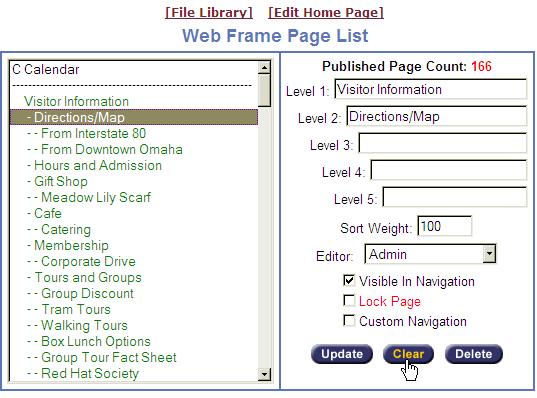
3. Click
the "Clear" button on the bottom right. This will clear the text from the text
boxes so that you can type in the name of your new page. (Clicking the "Clear"
button will not delete any pages)
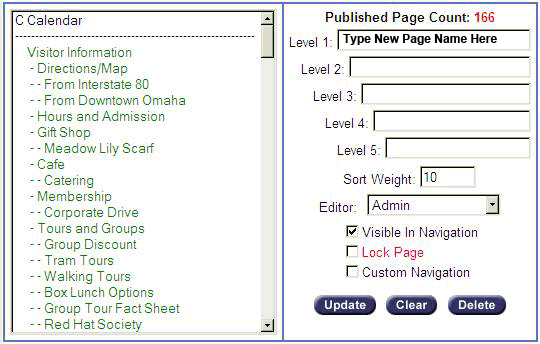
4. Adding a primary Level 1 page: With the
text areas cleared you can now type in the name of your new page in the text
box field to the right of "Level 1:", click the "Update" button, and your new
page has been added to your website. (example below)
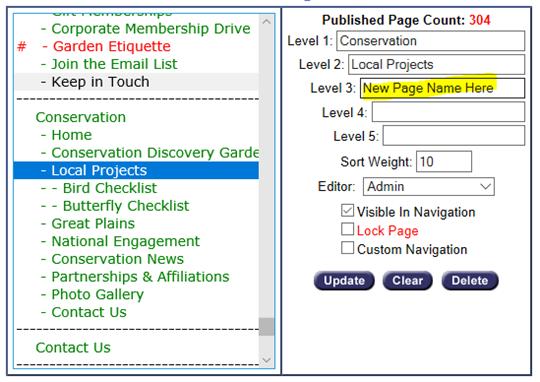
Adding a sublevel page (Levels 2-5): From the page list on the
left, select the parent page you want to add the new page under. The parent
page name(s) will populate on the right side. In the next blank "Level" text
box field, type in the name of your new page, then click the "Update" button.
(example below adding a Level 3 page under "Local Projects")
5. Assign
the "Sort Weight" number to your new page.
The "Sort Weight" allows you to control the order of the web pages
within the section you're working in.
See Changing
the Order of Web Pages
6. Now
that you have added your new page, you are ready to add content to the new
page.
7. See
Editing
Page Content